Why this guide exists
I wanted Hermes Agent to feel less like one giant assistant and more like a real operator system. Atlas was already useful as my primary Hermes operator, but the next step was obvious: break repeatable work into specialist lanes.
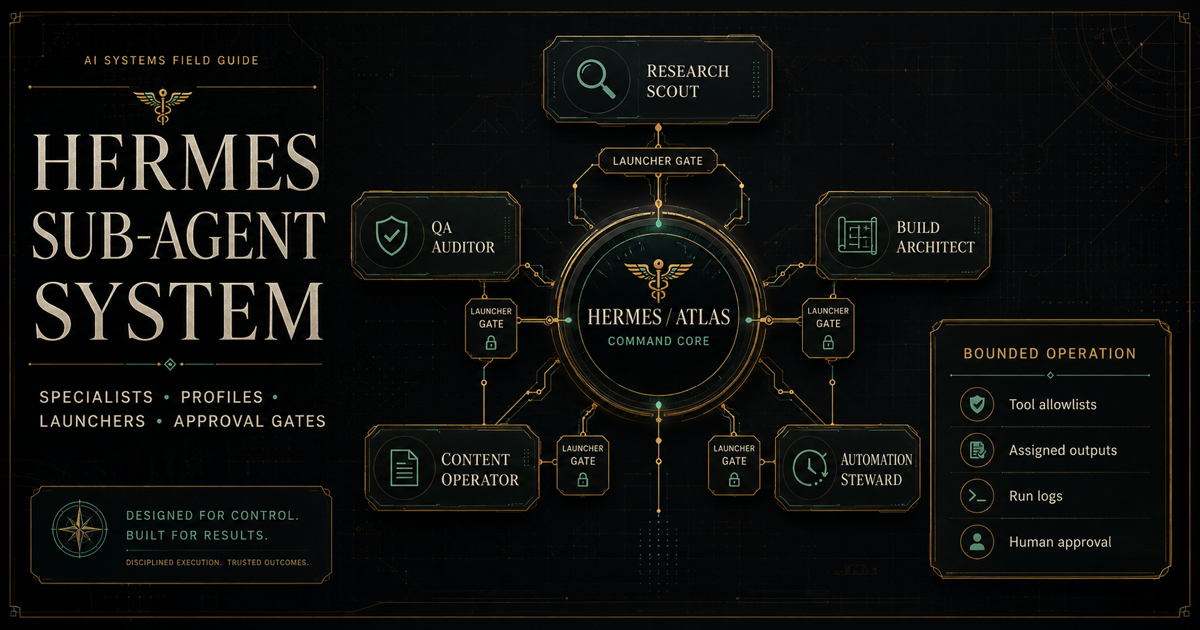
The tempting mistake is to call that autonomy too early. A system can look impressive while still being unsafe, vague, or expensive. The version that actually worked for me was bounded: Atlas routes the work, each specialist has a lane, the launcher controls execution, outputs land in assigned folders, and approval gates decide what moves forward.
The point: the strongest specialist system is not "agents do whatever they want." It is "the right specialist gets the right task, with the right tools, inside the right boundary, and a human-controlled approval path."
What this system is
A bounded Hermes sub-agent system is a structured way to split work across specialized agent roles instead of giving one assistant every responsibility. The operator still owns the decision path. The specialists make the work sharper.
In my setup, Atlas stayed as the router and coordinator. The specialist agents became narrow lanes for research, quality review, build planning, documentation, and automation governance.
What this system is not
This is not a permissionless agent swarm. It is not five agents with every tool, every credential, and full authority to act. That may sound exciting, but it is exactly how an operator system becomes noisy, expensive, and hard to trust.
- It is not fully autonomous by default.
- It is not a replacement for human approval.
- It is not broad OAuth for every profile.
- It is not automatic publishing, messaging, deletion, or production access.
- It is not "profiles alone are security boundaries."
Important: Hermes profiles can separate state and configuration, but I do not treat profile folders by themselves as hard security boundaries. The safer model is launcher-enforced routing, explicit toolset allowlists, assigned paths, logs, and approval gates.
The core architecture
The architecture is simple on purpose. One operator receives the work. Specialists handle bounded lanes. A launcher decides what each specialist can access. Logs and QA artifacts create receipts.
The five specialist roles
These were the five roles we built into the Hermes specialist system. They are useful because they are different. If every specialist gets the same tools and the same mission, the system is only pretending to specialize.
Research Scout
Research Scout gathers evidence, source trails, and bounded findings. In a safer setup, it starts with approved local/export inputs, then graduates to read-only public or approved-folder sources.
- Allowed: evidence summaries, source comparison, citation trails, public/read-only research.
- Restricted: broad browsing, account login, private material, paid/API-billed sources without approval.
- Example task: compare three AI video providers and summarize cost, rights, and setup paths.
QA / Critique Auditor
QA is the control layer. It audits packages, checks claims, catches missing boundaries, and keeps "ready" from being used too early.
- Allowed: artifact audits, boundary checks, readiness reviews, source/status validation.
- Restricted: making final approval decisions, changing production systems, running broad tools.
- Example task: audit a Research Scout report for citation quality and overreach.
Build Architect
Build Architect designs implementation plans and handoffs. It should not be treated as a production engineer by default. The first safe lane is design-only.
- Allowed: system plans, acceptance criteria, folder structures, rollback plans, handoff specs.
- Restricted: direct code execution, production edits, broad shell access, deployment actions.
- Example task: design a safe first pilot workflow for an AI-generated scenic video pipeline.
Content / Documentation Operator
Content Operator turns approved source material into guides, templates, handoffs, summaries, and operator-facing packets.
- Allowed: documentation packages, source-bound guides, templates, checklists, field notes.
- Restricted: inventing facts, publishing externally, using private material without approval.
- Example task: turn a QA-cleared setup log into a public-facing operator guide.
Automation Steward
Automation Steward is not an automation executor at first. It is the gatekeeper that says whether something is ready to be scheduled, monitored, or made recurring.
- Allowed: readiness reviews, no-go memos, rollback rules, monitoring criteria, pilot proposals.
- Restricted: creating cron jobs, webhooks, delivery, external actions, or production triggers without explicit approval.
- Example task: evaluate whether a morning briefing workflow is ready for a limited save-only scheduled pilot.
Step-by-step build process
This is the sequence I would use again. It is slower than just handing out tools, but it produces a system you can actually trust.
- Define the operating model. Decide who routes work, who approves work, and what is blocked by default.
- Create specialist role docs. Write purpose, allowed work, restricted work, refusal behavior, and example tasks.
- Create profile shells. Make the specialists visible without adding credentials or broad tools yet.
- Assign tool boundaries. Start with local/export and file-only lanes wherever possible.
- Create runtime packages. Include prompts, templates, checklists, and expected outputs.
- Build the launcher. Hard-map profile, toolset, skill, source path, and output path.
- Create a command deck. Give the operator one visual surface for what exists, what is active, and what is blocked.
- Run manual tests. Do not schedule a specialist until manual runs become boring and reliable.
- Add read-only OAuth only where needed. Research and QA may need read-only source access before other specialists do.
- Run launcher-routed live invocation. Prove each specialist can run through the launcher without direct/freeform access.
- Audit results. Have QA review important outputs and boundary claims.
- Only then consider limited automation. Use short pilots, explicit stop rules, logs, and renewal approval.
Example folder structure
Your exact paths will be different. The important pattern is separation: source docs, runtime packages, profile shells, launchers, outputs, logs, and audits should not be mixed together.
hermes-ecosystem/
  runtime/
    research-scout/
    qa-critique-auditor/
    build-architect/
    content-documentation-operator/
    automation-steward/
  profiles/
    research-scout/
    qa-critique-auditor/
    build-architect/
    content-documentation-operator/
    automation-steward/
  operator-console/
    specialist-command-deck.html
    invocation-snippet-library.md
    status-matrix.md
  launchers/
    specialist-invocation-launcher.py
  runs/
    research-scout/
    qa-critique-auditor/
    build-architect/
    content-documentation-operator/
    automation-steward/
  audits/
  approvals/
  source-of-truth/
Example launcher pattern
The launcher is the difference between "I have profiles" and "I can route specialists safely." It should make the allowed path explicit and boring.
SPECIALISTS = {
  "qa": {
    "profile": "qa-critique-auditor",
    "toolsets": ["file"],
    "skill": "qa-file-document-audit",
    "output_root": "runs/qa-critique-auditor/"
  },
  "research": {
    "profile": "research-scout",
    "toolsets": ["file"],
    "skill": "research-scout-readonly-research",
    "output_root": "runs/research-scout/"
  }
}

def launch_specialist(name, task_file, output_file):
    spec = SPECIALISTS[name]
    assert output_file.startswith(spec["output_root"])
    assert task_file.startswith("approved-inputs/")

    run([
      "hermes",
      "--profile", spec["profile"],
      "--toolsets", ",".join(spec["toolsets"]),
      "--skills", spec["skill"],
      "run",
      "--input", task_file,
      "--output", output_file
    ])
Do not put secrets in the launcher. Credentials belong in restricted environment/config storage, not repo files, exports, logs, screenshots, or specialist prompts.
Approval and safety model
The approval model is what keeps the system useful. Without it, "specialists" quickly become an excuse to let tools act without context.
- Read-only first. Start with file reads and approved source packets before any write or external access.
- No broad OAuth by default. Use dedicated test accounts, narrow scopes, and approved folders.
- No publishing by default. Social posting, messaging, upload, delivery, or external sync needs separate approval.
- No important file changes without explicit approval. Back up before editing anything that affects runtime behavior.
- Log outputs. Every serious run should create a run log, output artifact, or QA receipt.
- Use fake fixtures first. Prove the workflow before using private, production, customer, or source-code material.
Testing checklist
I do not consider a specialist "live" because a folder exists. It has to pass a small, boring test.
Common mistakes
Most specialist systems fail because they scale permission faster than reliability. These are the mistakes I would avoid.
- Calling it autonomous too early. A manual specialist conveyor is still valuable.
- Giving every specialist every tool. That defeats the point of specialization.
- Skipping role docs. Without a role document, the specialist has no stable lane.
- Treating profile folders as hard security boundaries. Verify actual launch behavior and tool inheritance.
- Adding OAuth too early. Start with local/export sources, then narrow read-only scopes.
- Skipping logs. If you cannot explain what happened, you cannot safely improve it.
- Automating before manual runs are boring. If a workflow is not reliable manually, scheduling it will amplify the mess.
Final operating principle
The version that worked was not a swarm. It was a specialist operating system with lanes, receipts, and approvals.
Atlas routes. Specialists handle bounded work. The launcher enforces the shape of the run. QA challenges important outputs. The operator decides what gets approved, expanded, scheduled, or stopped.
Build the capability, then earn the automation. Profiles make the system visible. Launchers make it usable. Logs make it reviewable. Approval gates make it trustworthy.